What is virtual staging?
ShowDwell field guide · Updated September 2026
Digital furniture can make an empty listing easier to read. The useful version is honest about what changed, preserves the property, and keeps the original photograph close at hand.
6 minute read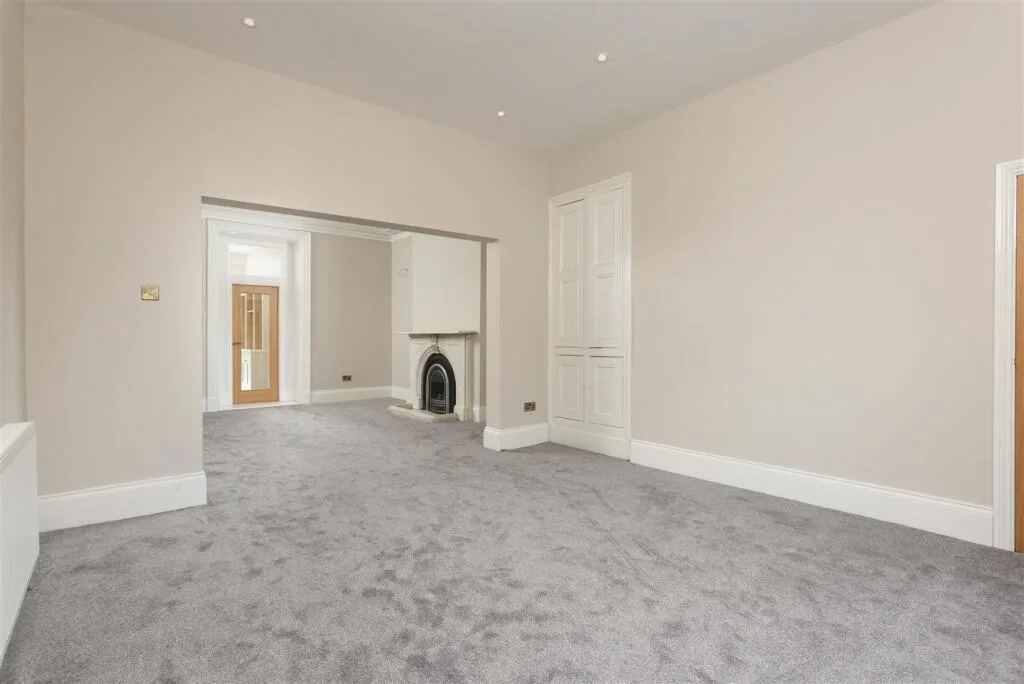 Original
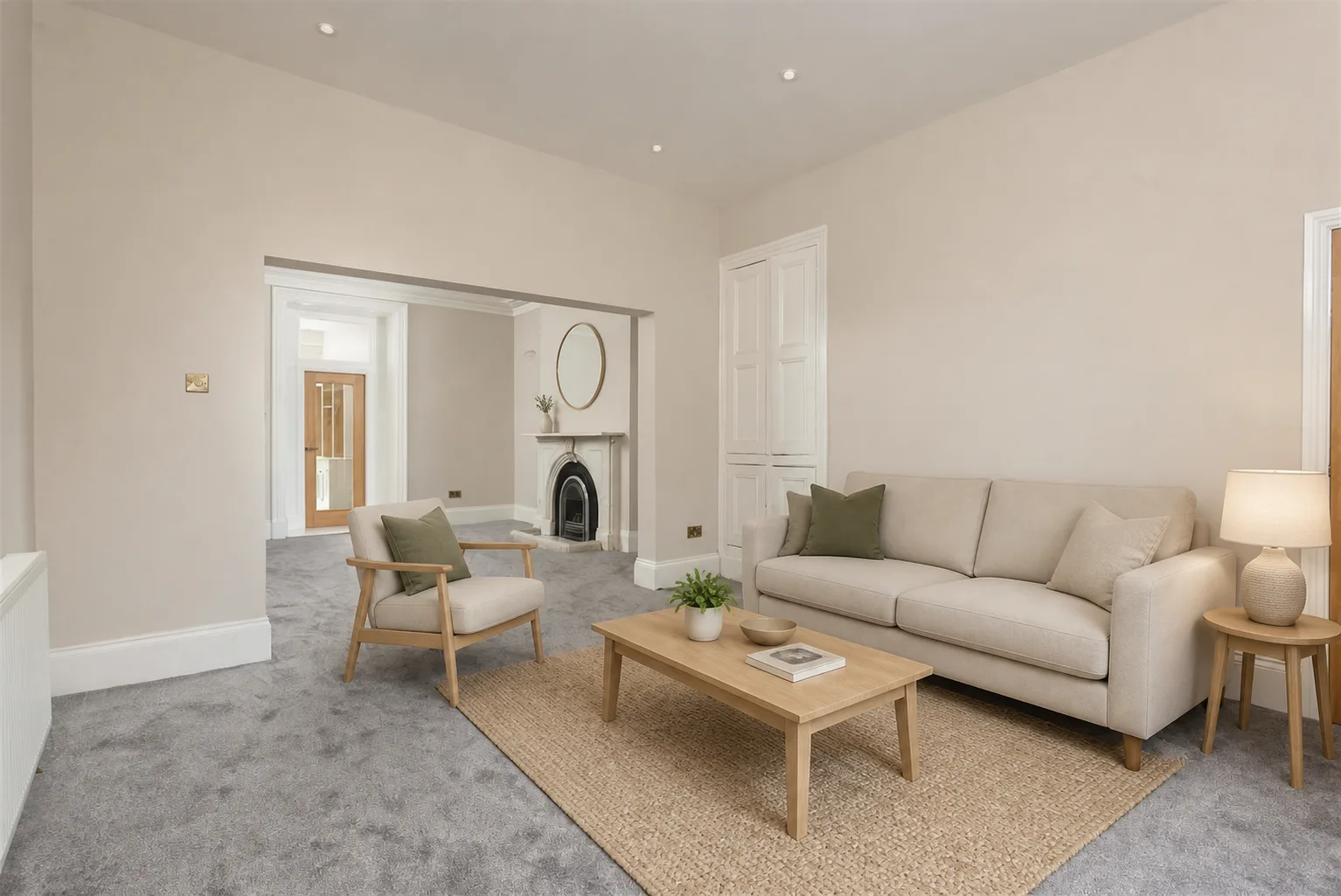 Virtually staged
What is virtual staging?
Virtual staging is the digital furnishing of an empty room in a listing photograph. A stager — or an AI model — adds furniture, rugs, art and lighting to a photo of a room that is physically empty, so buyers can read the space. The property itself is not altered.
The finished image is a marketing illustration, not a photograph of furniture that will be present at a viewing. Its job is to answer practical questions that an empty room often leaves hanging: where might the sofa sit, is there room for a dining table, and how could someone move through the space? Good virtual staging supplies scale and purpose without hiding the room that is actually for sale.
That boundary matters. Adding a freestanding bed is staging. Moving a window, widening a doorway, replacing a fitted kitchen, hiding a radiator or changing the floor is a representation of a different property. A careful workflow starts with the original image, treats architecture and fixed fittings as locked, and asks a person to compare the result against the source before publication.
Virtual staging vs. physical staging
Both approaches help buyers understand a room, but they operate at different points in the listing process. Physical staging changes the space itself; virtual staging changes only the marketing image.
| Question | Virtual staging | Physical staging |
|---|---|---|
| Cost per room | Usually priced per image, image pack or software subscription. | Usually quoted per room or project, with furniture hire and logistics. |
| Turnaround | From minutes for self-serve tools to a few business days for edited services. | Requires selection, delivery, installation and later collection. |
| Who does it | An editor, designer or AI tool working from the listing photograph. | A stager and installation team working inside the property. |
| What buyers see on arrival | The real room, often empty; the listing should identify staged images. | The furniture and layout shown in the listing may still be in place. |
Physical staging can shape the in-person viewing as well as the photography. Virtual staging cannot do that, but it can be useful when a property is already empty, access is limited, or a listing needs several room concepts without moving furniture through the home.
What does it cost?
There is no honest single market price: self-serve AI, per-image editing and full physical staging are different services with different labor, turnaround and revision support. Compare the checkout total, the number of usable images and the review process—not only the smallest advertised unit price. ShowDwell publishes its current allowances and billing terms in the pricing section, and the market-wide numbers are in what virtual staging costs.
When it works, and when it does not
Virtual staging works best when the source photograph is already a truthful, competent view of a clean room. The camera is level, the important openings are visible, the exposure is balanced, and the image contains enough detail for furniture to sit convincingly on the floor. In that setting, staging can show function without asking the seller to rent, deliver and insure real furniture.
It is especially useful for vacant living rooms, bedrooms and dining areas where scale is hard to judge. It can also redress removable furniture when the existing layout distracts from the room, with fixed cabinetry, appliances, fireplaces, doors, windows, floors and proportions treated as locked and checked against the source.
It cannot fix bad photography, poor light or a genuinely awkward room. Adding a beautiful sofa does not correct a tilted camera, recover detail from a blown window or create circulation space that is not there. It should not conceal damage, erase permanent features, imply a renovation, or make a small room look larger by shrinking the furniture. If the source image is weak, reshoot first. If the room itself is difficult, stage it honestly and let buyers see the constraint.
Do you have to disclose it?
Plan to disclose virtual staging, but do not assume one national instruction covers every listing. Rules differ by MLS, portal, brokerage and jurisdiction. For example, CVR MLS requires disclosure in the remarks field, while Canopy MLS requires a visible disclosure and the original image alongside the staged version. ARMLS uses its Digitally Altered disclosure workflow.
The common principle is straightforward: do not let a buyer mistake a conceptual image for the room as it stands. The 2026 National Association of Realtors Code of Ethics requires a true picture in advertising and prohibits misleading images, but local systems decide how that principle is implemented. Before publishing, check the current rule for the specific MLS or portal, follow the brokerage’s policy, label the staged image in the required place, and retain the untouched original. This guide is general information, not legal or MLS-compliance advice.
How AI changed it
Traditional virtual staging is an editing service: a person receives the photograph, works to a brief, and returns a composed image. AI made a self-serve version possible. A user can now upload a room, choose a buyer profile or style, generate a draft and compare it with the source in one session. That compresses the feedback loop, but it does not remove the need for judgment.
Current image models can edit an existing photograph rather than build a room from a blank canvas. The difficult part is preservation. A plausible image can still be wrong if a fitted unit moves, a door changes shape or a window appears. The safer product pattern is therefore not “press a button and publish.” It is: set a narrow furnishing brief, lock fixed features in the instruction, generate, compare side by side, reject any architectural drift, disclose the staged result and keep the original.
That is the approach behind ShowDwell’s Architecture Lock workflow. It gives the model a strict list of fixed features and keeps the final quality decision with the listing professional. If you have a suitable empty-room photograph, you can open the studio and test the process with one of the three images included each month.